Deploying Odoo has long meant one of two things. If you run Odoo Enterprise, you can use Odoo.sh, Odoo's own platform. If you run Odoo Community — like many of the businesses we work with — you usually build it yourself: a Dockerfile here, a deploy script there, and a restart that you hope comes back up. Today we are introducing ERPForge, the platform we built to stop doing that.
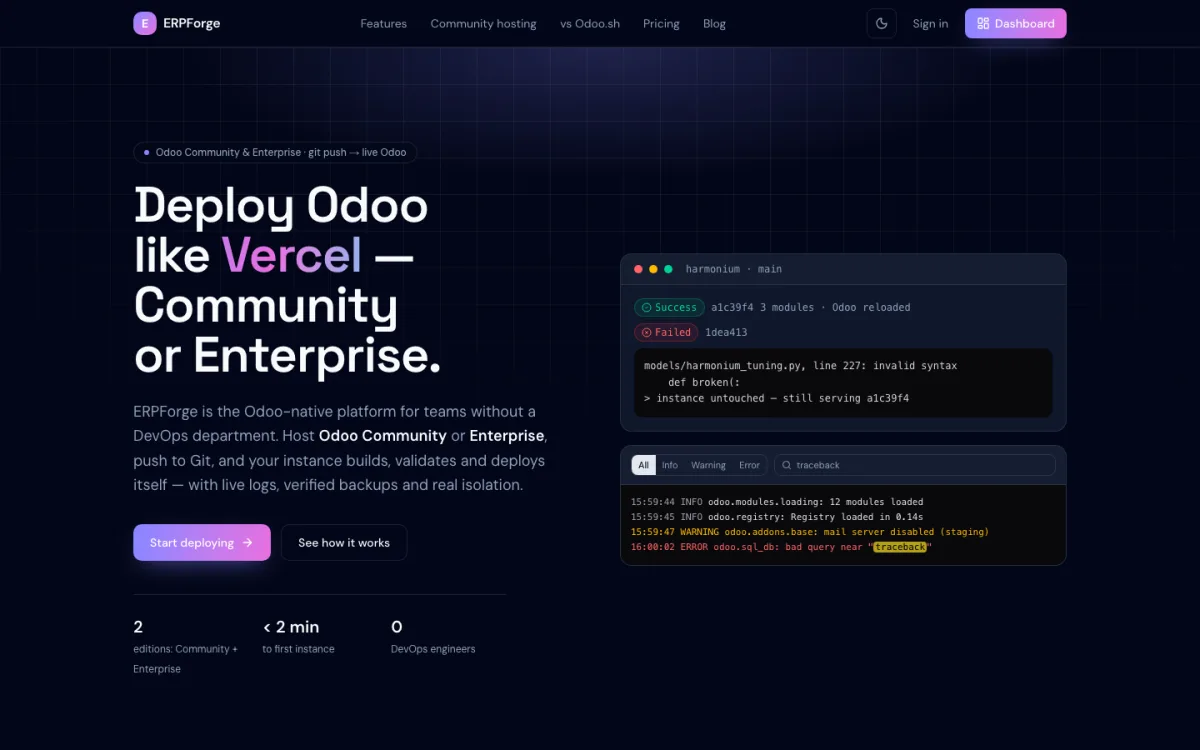
ERPForge is an Odoo-native Platform-as-a-Service. You connect a GitHub repository, choose an Odoo version, and from then on every git push builds, validates and deploys your Odoo. It is opening to customers in stages, starting now with early access.
Why we built ERPForge
Scriptonix is an Odoo implementation partner. Every week we ship custom modules, fixes and upgrades, and the same problems kept coming back:
- Community had no official platform. Odoo.sh runs Odoo Enterprise only, so Community projects missed out on its git-push workflow and staging.
- Every project was its own snowflake. Different Docker setups, different deploy scripts, different ideas of where the addons path lives — and the knowledge sat in one engineer's head.
- A typo could take production down. A module with a syntax error, copied onto a running server and followed by a restart, means Odoo does not come back up.
ERPForge turns that into one repeatable pipeline that understands Odoo.
What ERPForge does
Git push is the deploy
Connect GitHub once and map a branch to an instance. Each push clones your modules, validates them and reloads Odoo. There are no Dockerfiles to maintain and no restart scripts to remember.
Builds that fail safely
This is the feature we wanted most. If a pushed module has a syntax or indentation error, the build fails before anything is promoted. The build log points at the exact file and line, and the running instance keeps serving the last commit that worked. Your users never see the broken version.
Production, staging and development instances
One project can hold production, staging and development instances. Each gets its own Odoo container, PostgreSQL database, filestore and private network, with its own resource limits. A staging instance gets its own copy of your production data, neutralized with Odoo's built-in routine: outgoing mail, scheduled jobs and payment providers are switched off, so tests don't email customers or charge cards.
Live logs and a workspace in the browser
The Odoo server log streams in real time with level filters, full-text search and highlighting — find the traceback without scrolling through thousands of lines. For everything you would normally SSH in for, there is a code editor, a real terminal, an Odoo shell and a database explorer with a read-only SQL runner, all scoped to the instance you are looking at.
Backups, metrics and scaling
Take a backup of the database and filestore whenever you need one and restore it from the dashboard; before a production instance is deleted, a final backup is taken automatically. Live CPU, memory and network charts and an instance health status come built in, and workers scale with one click.
How a deploy works
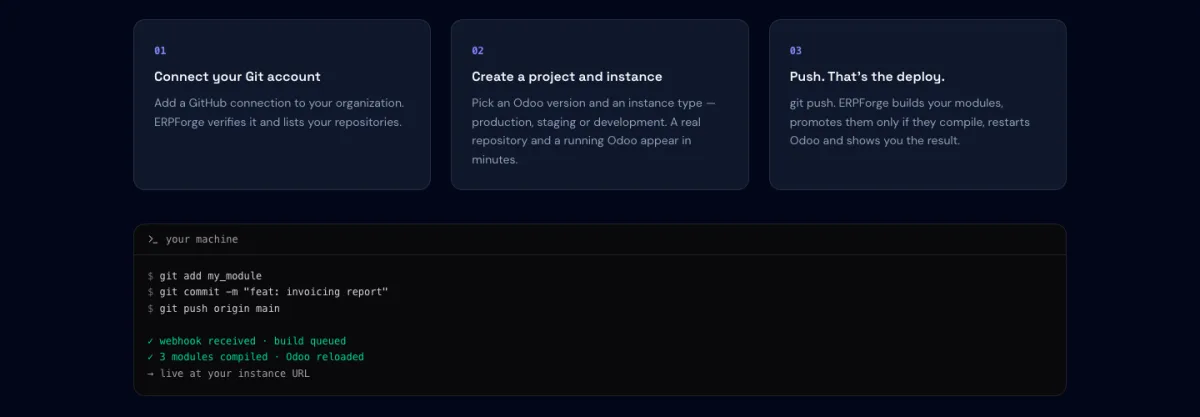
- Connect GitHub. Add a GitHub connection to your organization; ERPForge verifies it and lists your repositories.
- Create a project and an instance. Pick the Odoo version and the instance type. A running Odoo appears in minutes.
- Push. ERPForge builds your modules, promotes them only if they compile, restarts Odoo and shows you the result.
Odoo 17 to 20
ERPForge runs Odoo 20, 19, 18 and 17. Odoo 19 is the default for new instances, because many third-party modules are not yet ported to Odoo 20; Odoo 17 is in maintenance. You choose the version per instance, so different projects can sit on different releases in one dashboard.
One design choice matters if you host business-critical Odoo: your users' requests are routed by the edge proxy straight to your Odoo container and do not pass through the ERPForge dashboard or API. If the dashboard is ever unavailable, your Odoo keeps running.
Who ERPForge is for
- Businesses on Odoo Community who want a proper deploy workflow without hiring DevOps.
- Odoo partners and agencies who host many client instances and want them all built the same way.
- Teams that have been burned by a broken deploy and want builds that fail safely.
Get early access
ERPForge is opening to customers in stages. Request early access and we will set up your account and walk you through your first deploy. Read more on the ERPForge page, see the published plans on erpforge.scriptonix.com, or talk to us about moving an existing Odoo.
Odoo is a trademark of Odoo S.A. ERPForge is not affiliated with or endorsed by Odoo S.A.